Update (6/18/2010): Modified post to reflect the new URLs on github. This project is no longer updated on Google Code.
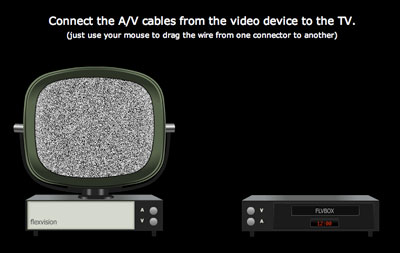
After a few weeks of hard work, I’m happy to present flexwires, an open source library featuring “wiring” components for Flex. If you’ve ever played with Yahoo! Pipes, you’ll understand the UI paradigm I’m talking about. Basically, data is passed around the application by connecting jacks together with wires, similar to how one might connect cables between a TV and DVD player or from a computer to a network.
Be sure to take a look at the fun YouTube video player example:
flexwires is available for download from github under the terms of the MIT license, so it may easily be used freely in both open source and commercial products. Be sure to take a look at the API documentation, and the source code for the examples are available in the main ZIP file. A simple tutorial on the wiki walks you through adding the library SWC to your project and explains the Getting Started example.
Update: In addition to releasing the library, I’ve made minor updates to Logicly, the logic gate simulator I posted about last week. The logic gates now support circular references, which allows some particularly interesting circuits to be created.
Update: I forgot to mention something very important. Due to a bug in earlier versions of the Flex SDK, flexwires requires Flex 3.2 at the minimum, so be sure to update, if you haven’t already.
Man, you’ve gone to a lot of trouble just to rickroll us all… 🙂
hi josh,
thanx for this really cool app. cant’ wait to test the api!
btw – i found a litle bug in your gate simulator: put a xnor gate instance on stage an connect the output somewhere. while dragging the cable i get some gfx errors. i’m using f10 player.
best regards
jan viehweger
halle, germany
Rob: Haha. Are you saying I didn’t have to write all that code to do a rickroll? Man, three weeks wasted!
jan viehweger: I wasn’t able to recreate that bug.
Wow, this looks awesome, Josh. Can’t wait for an excuse to play with this.
This is really cool.
Trying out the examples but I can’t get the lines to connect, not even when trying your examples and not change anything. Only thing that works is your online demo =/
Bäcker, thanks for reminding me. The library requires that you use the 3.2 version of the Flex SDK. I will update the post to include that information.
Works as designed here.
Are you the guru behind Yahoo! Pipes sleek wiring?
Love the effect, wiring and all, especially the clever use of bitmapdata noise function, your tube frame, and the tune you picked.
Planning to check out flexwires soon and maybe even use it for some social web mashup.
I think this nifty component can do more than Yahoo! Pipes and provide a very cool and enticing interface to connect people online.
Taras, I had nothing to do with Yahoo! Pipes (other than coincidentally working at Yahoo! when it went live). Glad you like the library, and I hope it works well for you if you decide to use it. Let me know if you run into problems or have any suggestions.
This is very cool! Im going to play with it tomorrow. I will definetly use this on an application in the near future. Thanks for all the hard work and thanks for sharing!
Thanks Josh Tynjala, we have some project about controller system, the Input and Output in Our Circuit Board will control by Flex through XMLSocket, and trigger by logic gate created by flex. Thanks for your ideal. Sorry my bad English.
cool app. how bout a video of girls kissing or cell division? i watched that entire thing, couldn’t look away. . . need a shower . . . feel so dirty
Still loving it, so easy to work with. When using Flex SDK 3.2 it works like a charm.
Tried to use it for an AIR Application (also with 3.2 sdk) but complains on DragProxy when the drag image is created. Any idéa?
Bäcker, I haven’t tried the library in AIR yet. I’ll take a look when I get a chance.
This is really amazing stuff thanks 10x.
However does it work with just Raw AS3? Also I’m going to make this work with multi-touch 🙂
nuiman, flexwires requires the Flex framework. The components are certainly available in ActionScript (in addition to MXML, of course), but it has to be a Flex app.
I’ve found a workaround to get it running in AIR.
First you need to download the source from SVN. Create a Flex Library project and make sure to include the AIR libraries.
Next open up WireJackArrowDragImage.as
Line 164 – updateDisplayList method
replace this:
with this:
var proxy:DragProxy;
if ( Capabilities.playerType == 'Desktop' )
{
   proxy = DragProxy(this.parent as NativeDragManager);
} else {
   proxy = DragProxy(this.parent);
}
add a private var tempStage:Stage to the class, and within the addedStageHandler set tempStage = this.stage
finally, within addedToStageHandler and stageMouseUpHandler change the reference this.stage to tempStage
compile and use the resulting SWC within your AIR app. It should work without any errors. I realize it’s kind of a hack, but it gets the job done relatively simply.
The problem has to do with the fact that if you are using WindowedApplication as your application root tag, the application by default will only use the NativeDragManager. Your two options for getting flexwires to work in an AIR application are 1) build your AIR app with Application as the application root tag, or 2) use something like my little hack.
Thanks, Nick. That’s a great start for me to start debugging the problem in AIR.
I tried Nick’s AIR hack but with no luck. Has any progress been made on an AIR patch?
I’ve committed some changes to the repository on Google Code that fix the runtime error when trying to use flexwires in AIR. However, it appears that the AIR version of the framework has an IDragManager implementation that behaves very, very differently in several ways than the default implementation. While the error no longer happens, the drag image appears to be removed from the display list almost immediately after being created. Not sure why.
I’ve also added a new
clickToDragstatic property to theWireJackclass. This allows an alternate drag interaction where you click on one jack (including releasing the mouse button), and then the wire will follow the mouse until you click again. If the target of the second click is another jack, then the connection is made. Otherwise, the wire disappears when you click anywhere just as if you released the mouse button during a normal drag.Personally, I found that it felt a little more natural for my finger to do two simple clicks to connect a pair of jacks rather than mouseDown->drag->mouseUp. That said, not everyone may agree, so the standard drag behavior is still the default.
As you can see above, it’s easy to setup. Since it is a static property, you can just drop that directly in an MXML
Scriptblock (no function needed).First and foremost, great work and thanks for the generosity to release this code open source. We are planning to use it as a base for a node-link chaining to create data-based 3d visualization scenes. We have a few questions…for example, most of the demos show an InputJack or an Output Jack. Wondering what the best approach is for a situation where a node is to serve as both (e.g. a logic chain) and in cases where an output may go to several nodes. Is there a forum to pose such questions?
Thanks
JB, an output should be able to connect to several different inputs by default. However, you should ensure that the wires are placed on a WireSurface under the jacks (instead of the default surface that gets placed on the PopUpManager) so that wires appear below the jacks and don’t block additional connections.
A chain should be possible too. However, you probably don’t want to use InputWireJack and OutputWireJack. I wouldn’t know for sure without testing, but you might be able to use their base class, WireJack, without any modifications. It doesn’t have default restrictions on how it can be connected to specific types of jacks.
There is no forum or mailing list set up for flexwires. You can post a comment here, or use my contact form, if you prefer. Either way, I’ll be notified by email.
As an FYI for anyone reading the comments, the issues described above, regarding Adobe AIR, are now fixed. You can download version 1.1.0 or newer over at GitHub.
am developing an application to drow ER diagrams and conver those ER diagrams to Object relational database schema is there any flex class to draw an ER diagram or any kind of diagrams ?? udanajeewantha@gmail.com
Hey Josh, Thanks a lot for this project! I’m doing a basic diagramming application as a college project and would like to have multiple connections from an output jack. You had mentioned that we need to add a wire surface to accomplish this. I went through the source but could not understand what you implied. Also JB, have you worked this out?
RA, by default, there’s a display object on the PopUpManager where all the wires appear. In flexwires, there’s a class called WireSurface. Create one of these somewhere under your WireJacks. Then, pass it to the wireManager property of each of the WireJacks. All the wires should then appear on the WireSurface instead of on the PopUpManager.
The IntroductionToJacks example in flexwires uses WireSurfaces because wires must disappear when the Accordion page changes. That might be a good place to start.
Thanks a ton for the quick turnaround. I’ll look at this example. Hopefully should also solve the problem of wires remaining on the screen when i change the viewstack. Thanks again!