Update: flexwires, the UI library used in this application, is now available for download. Read my introductory blog post about flexwires.
Recently, I decided to take some time off to relax and take a short break from regular day-to-day software development. At least that was the plan. A few days into my much-needed vacation, I got the itch to write some code, and I soon started building a library for Flex to allow “wires” to transmit data among controls in an application. Have you played with Yahoo! Pipes? It’s basically the same sort of UI concept, but built for Flex.
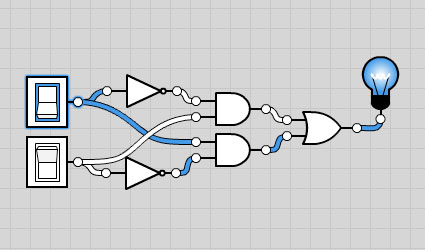
To test the library, and to have a more complex application that could show off its features, I started building an app that I call Logicly (yes, I know, I’ve been infected with the trendy Web 2.0 misspelling bug). During my university days, one of my professors requested that we students build an application much like this one so that he could use it for demonstrations in his Computer Architecture classes. Basically, Logicly allows you to chain together “logic gates” to simulate the boolean algebra used by digital circuitry. You know, simple operations like AND, OR, NOT, XOR, and others. Nothing revolutionary. In fact, I found several 90s-era Java applets that do the same thing, but I’ve got to say that a Flex app feels much more responsive and rich than that old Java stuff, even without a very creative skin.
If you’re interested in playing with the wiring library, I’m going to have to ask you to be patient for a bit. It will be an open source release, but I still need to finish writing documentation and building some simple examples to get everyone started. Additionally, the library is not compatible with the current version of the Flex SDK. There’s a bug with the drag manager when you use custom cursors, and I had to start using the 3.2 nightly builds to finish development. In short, stay tuned while I get everything polished, and enjoy the Logicly preview app for now.
Dude, as always it looks like it will be an awesome library, and knowing your work will be well commented and doc’ed. Cant wait.
Thanks, Campbell. I hope to get everything released within the next week or so, if possible.
Josh,
I am looking forward to playing with your library once you release it to the wild. I have seen other implementations that use the “wiring” approach, like aviari.com’s Peacock and SourceBinder, but I have no clue how they have implemented the wiring capability.
Hence, it will be fun to learn.
very cool! however something seems to be lacking, i tried to build a memory cell out of NOR gates, and it wouldn’t let me make all of the connections. eg see this diagram.
I was trying to build a binary counter using the clock as input and lightbulbs as output 😛
Maybe just add a few more features (like load/save circuit to local hard drive thanks to flash 10), and soon you’ll see people building whole computers inside it 😀
David R: Yeah, I haven’t implemented everything that could be done in this sort of application. It’s mainly just a demo of the wire library. In particular, the type of circuit you’re trying to build has a loop in it, and I specifically cancel connections of that type because the data update events put the wire system into an infinite loop (something I intend to clean up soon). I’m not sure if I’ll expand this demo beyond what’s there already, but if I get enough interest, I’ll certainly look into adding more features.
Hey Josh, this looks great! It also looks like it could save me a lot of trouble in the very near future. How tied to the data-flow side of things is the layout / modelling code? I’m looking to build several different systems all based on “lines connecting widgets”, so you can see why I’d be interested! Please keep us up to date with the progress!
Josh McDonald: the library is very flexible in most aspects. The default controls developers will use are the OutputWireJack and InputWireJack components. These automatically enforce the direction in which data is passed. Their base class, simply named WireJack, has no such restrictions. There are also other things, like the dataFormat and acceptedDataFormat properties, that you can use to put further restrictions on how jacks may be connected.
The layout system is pretty straightforward. The wire jacks may be placed anywhere in your application. They’re just regular UI controls. The wires themselves are handled by an IWireManager. They’re designed to use an item renderer-like system where you can replace them with custom implementations that have different appearances or behaviors (imagine implementing a wire renderer with a physics library to make it appear more realistic).
I’m not sure if that helps answer your specific question, but it does give you a better idea of how the library will work.
Very nice. By coincidence, I just built something in a similar vain: Link
I’m hoping to use it to wire together Pixel Bender filters.
Cheers,
Simon
That’s very nicely done! One tiny thing, you might reduce the proximity sensitivity–when making connections it seems too touchy.
Great work!
Looking forward for library release.
Good job!
It would be really nice to have this example with more features/elements (like transistors, looping, changeable timer values, caches, etc…)
A perfect app to test and learn IT behavior in school, for example.
Cheers Thomas
Buuu…. It’s impossible to create a flip-flop from NAND or NOR gates… 😉
I’ve uploaded a new version. It looks like I fixed my earlier problems with circular references because I was able to successfully put together a D-type flip-flop without any stack overflows. Have fun!
Very cool. Are you planning to release the source to Logicly in addition to the wires stuff?
Manuel, I’m not sure if I will release the source to Logicly or not. It’s a lot of code to document and clean up.
Josh,
A link to Logicly was posted onto Reddit.com about 10:00 UTC Sunday 3rd May, and there are a lot of positive comments there.
Thanks for making such a fun application.
Best wishes,
Peter
Thanks, Peter. I was wondering why I had suddenly received several emails related to this application. I’m excited that the Reddit community is having so much fun playing with it. So many interesting screenshots of circuits in the comments. I love it!
It’s very pretty, but I don’t always agree with the way the wires curve.
You still can’t make a proper
D Flip Flop. The problem isn’t readily apparent until you try to build a circular shift register (where the last bit feeds itself into the first when the clock goes high).
Example
It works properly in LogicSim if you need an example of what it *should* do. If only LogicSim was as pretty.
Hi.
Excelent work, have you think in open the source code ?
I’m interested in extend this application to add more componentes like circuits, save the diagrams and reuse it in other diagrams.
Tanks in advance
cipa, I have no plans to open the source code at this time.
It took me a while, especially since I forgot how and had to figure it out on my own, but I built a 3 bit ripple counter. I took a screenshot, but I don’t know how to upload it here 🙁
Hi Josh,
I am glad to see the working of logiac gate simulator. I am sure that It will also help me for my research work, where I need to keep testing some gates and observign different effects of different gates.
I thank Mr. P.G. Bhat, for guiding me through a wounderful link so that I could make my job easier…
I thanks josh again,
may i download your logicly?
Buddy, if you’re looking for the source code, it is not available. There’s no desktop version of the app. In theory, you could download the SWF and run it directly in the browser, I guess.
Simulator Logicly
From the source code above, can I open a browser with Logicly.swf, without first not connected to the internet?
“http://download.macromedia.com/pub/shockwave/cabs/flash/swflash.cab#version=6,0,29,0”
“http://www.macromedia.com/shockwave/download/index.cgi?P1_Prod_Version=ShockwaveFlash”
You can make a flip-flop. But, I can’t seem to make a flip-flop with out a clock. I had to play a round with it before it worked. Start by connecting the clock and switchs to the NAND gates then make the loop and connect the outputs. Finaly, connect the NAND gates together and pick your first mode. Instead of the ‘play’ button press the ‘advance one tick’ button and the correct light bulb will turn on. It also has all it’s properties like R=S=0 is ‘HOLD’ position and you should be able to make a ‘Master-slave’ (FYI: A master-slave is two clocked flip-flops one after-the-other where Q for the first one is R for the second and NOT Q is S for the second. Only diff is that the second flip-flop has the clock inverted (There is only one clock input) before going into it. This way (I think. I really have not tryed them out) the out put of the two flip-flops are the same. What this means is that the second flip-flop will not change the bits it gives out untill you pulse the clock from 0 to 1) I was also able to make a data-latch (A flip-flop with one input that is inverted for one NAND gate and not the other (A flip-flop with out a ‘HOLD’ position))
I just (like right now) made a flip-flop without a clock. But, I have to complaints (Not about the app. Josh, It’s great!):
1.Who has heared about the ‘HOLD’ position of a flip-flop being S=0,R=1 and
2. Why is the set button now on the bottom!
The final thing I made was so much fun was a J-K flip-flop. Look it up it and try to build it. I am not telling how just because it’s so much fun when you build it and try all the combinations of bits. HINT: Try J=K=1 first and pulse the clock ;))
Hi,
Thanks for the excellent tool. It’s indispensable for my beginner’s study in digital electronics.
I know that this was just a test bed for your wires library but man, your pretty application makes working with logic fun. I wonder if you have any plans to include some more advanced logic elements like flip flops etc. I know they can be constructed from the bare gates but it’s sometimes tedious.
Again, thanks for the app.
Some more suggestions I came up with while using your app:
– How about making the toggle on the switch a little smaller, (ie. the border should be a little bigger) bcz when I try to drag the switch, I often accidentally click the toggle.
– What about a cleanup feature? This would arrange the logic elements in a nice and clean way.
– When I want to label an input, I just take a screen shot and label it in GIMP. Maybe you could add a control for a labelled input (ie. A,B,Y). It wouldn’t have any functionality but just for presentation. Btw, it shouldn’t be a switch image, just a boxed letter.
– This I think is a really important feature: how about snapping onto connections. It’s somewhat painful to drag the wire (or click and click again) onto the connection. The radius for the connection is so small that I often miss the target. I suggest that when I drag a wire, it doesn’t move freely but simply jumps to potential connections. I hope I explained this properly.
– What about a ‘Generate a link to this circuit feature?’ Would be great in sending to friends.
Nice interface.
It doesn’t work with loops though.
I tried to make a D Flip-Flop, and the wires turned red.
It will say a wire is not connected properly if it is connected to another red wire, making an infinite loop. I was unable to break that red loop to make the d latch work.
Drew, I’m able to make this Gated D-latch and this Master Slave D Flip-Flop without any problems. Make sure you use input controls like the Switch or the Clock, or yes, you will see a whole lot of red.
It is a good program but it should be downloaded
Thanks for great application. I finally found what i’m looking for!!
I’m a high school teacher in South Korea.
If I may, i’m going to use this app in my computer achitecture class.
Can I see the source code? please mail me..
I don’t need the document stuff, I just need the source code..
I must optimize the source code to use in my class.
So, please, please show me the source code.
Thank you!!
(ps. sorry fot my poor english)
I’m sorry, but source code will not be made available for this application.
Great App. My son and I (he just turned 7) love the app. I found it after looking for a similar app from my childhood, Rocky’s Boots. In any case, as a fellow Flex developer (entirely on the enterprise side) I appreciate the library and what you are doing with Flex. Awesome.
Is there any chance you might extend logicly to persist/retrieve circuits? Even something as crude as a singleton local shared object would help… or download as an AIR app? I’d be happy to help (not that you need it).
Thanks for your contribution to the Inter-web! You rock! 😉
Just a massive thankyou – this has brought logic gates alive for my A level students – a fab app. Can I have your permission to download the SWF file for those classrooms without internet access?
great library!!!
Pingback: Logicly is back. Shiny new Flex 4 version is simulating now! « Josh Talks Flash
i like it…!!!
Nice application! I had built one like it for the TRS-80 Color computer almost 30 years ago. I’m toying with putting together a WORKING microprocessor using Logicly and would share these thoughts:
1. It would be nice to have labeling capability. I want to be able to draw frames and place labels within them That way, I can identify the accumulator, program counter, each instruction, etc.
2. I like the flexibility (pun intended) of the wires but it would be nice to force a wire to be straight. I want to be able to have address and data buses using parallel wires instead of the spaghetti I’m ending up with.
3. A tri-state buffer would alleviate these hellacious “or gate” cascades that I’m forced to use for instruction or memory select circuits.
4. Flip-flops would be a great addition! You have any idea how many of them I’ve been building by hand? That would save me the most components.
5. Programmable components! My project had a scalable DIP package (you could select an even number of pins) and a rudimentary programming script that allowed me to make shift registers, counters, almost anything I wanted. Right now that would alleviate the daunting challenge of creating more than a dozen bits of selectable memory!
Nice interface though! easy to use!
Len, thanks for the suggestions. I will certainly consider all of them. A couple of notes:
1) I plan to add text objects, for exactly that reason.
2) Yes, a mess of wires sucks. I haven’t quite figured out how I want to fix that issue, but be assured, it’s something I plan to address in the future.
4) Flip-flops are on the way! I have a couple working in an internal build right now.
I’ve been playing around with your Logicly.It’s pretty cool!
I’ll certainly be watching.
I’ve been working on a project that requires logic gates connected to
a BILATERAL switch. This appears to only be available in mixed simulator programs with bloated overhead and a fairly long and steep learning curve.
I’ve looked at a number of apps that are similar to yours but none allow
this type of switch.What are the chances in the future?
Have any suggestions?
My idea of a work around isn’t very suitable .
Roy, a bilateral switch looks like a challenging one to implement, since its connections can be both input and output, but it’s certainly possible that I could add it in the future. I’ll write it down and keep it in mind for future versions.
I bought a copy of Logicly, the big feature I would like is the ability to save a collection of gates into a more abstact device. Like taking the collection of gates and wires that make up a full adder and hiding all of the internal connections.
That would make it simpler to build complex circuits by building on previous work.
Frank, that’s something I want to add too. Some of the work is in place already, actually. It’s a big task, and I’m breaking it up into pieces that can be added over time. The flip-flops, for instance, are an abstraction that works exactly the way you describe. The gates and connections are there in the simulation. They’re just hidden behind a custom skin in the editor.