A preview of my first Flash game: Chroma Circuit

by Josh Tynjala

For the last couple of months, I’ve been quietly (or not so quietly, if you follow me on Twitter) developing a Flash game. Like a lot of software developers, games were what made me want to start programming in the first place. Finally, after getting a little burnt out and needing a bit of a break, I decided to spend some time focusing on making writing code fun for me again. After about a month and a half of exploration, I finished my first Flash game, and it’s called Chroma Circuit.
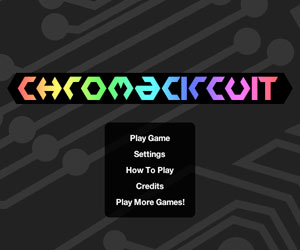
Screenshot of Chroma Circuit Title Screen
Chroma Circuit’s Title Screen

The basic idea behind Chroma Circuit is that, in each level, you need to match up colors on neighboring elements. Generally, this is done by rotating them, but some other mechanics are introduced later on. The game works a lot like a jigsaw puzzle, in a way, if a bit faster paced. You need to align the colors for every element on-screen before you can advance to the next level. To rotate an element clockwise, you just click it with your mouse. Hold shift, and it will rotate in the other direction. Several of my testers independently called it “addicting”.
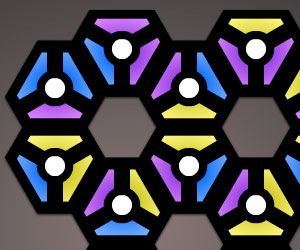
Screenshot of Chroma Circuit In Game 1
Three-Sided Rotating Elements

As the game progresses, levels contain more and more elements, and new elements are introduced over time. Three- and four-sided elements that may be rotated are the most basic types that appear when the game first starts. Later, transfer elements change colors and pass colors to different parts of the level to test the player’s spacial memory. Finally, in the last several levels, a new “bomb” element is introduced. Bombs must always match the colors of their neighboring elements, or they will explode, and you’ll be forced to restart the level.
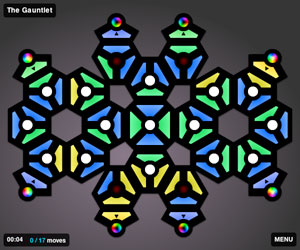
Screenshot of Chroma Circuit In Game 2
Watch out for The Gauntlet!

The game contains 18 hand-crafted levels that I spent a lot of time tweaking and play-testing. I had so much fun putting it all together (especially the number of mathematical challenges required to draw the elements programmatically!), and I’m excited to get started on my next game. Chroma Circuit can now be played on my Bowler Hat Games company site, and at various distribution partners across the web. If you think it’s fun, please share it with your friends!

About the Author

Josh Tynjala is an indie game developer, entrepreneur, Flash and Flex mercenary, and bowler hat enthusiast.

Discussion
  1. When you get around to blogging about your experience making flash games, I’d like to hear the full gory details about what is involved in getting a sponsor and if the money involved was worth the time spent. ( As opposed to just making a game for kicks and not finding a sponsor )

    posted by Brian C on 04.11.2009
  2. Great job! :)

    posted by Juegos Infantiles on 05.07.2009
  3. [...] puzzle games, Tetris and Collapse!. It’s a lot less of a thinker than my previous game, Chroma Circuit, but I wanted to aim at a more casual market this time. That said, I think everyone can enjoy [...]

    posted by New from Bowler Hat Games: Gridshock - Josh Talks Flash on 05.26.2009
  4. [...] pick strong primary colors with heavy saturation, in a balanced set of brightness levels. With both Chroma Circuit and Gridshock, a small number of players complained that some of the colors weren’t different [...]

    posted by Bowler Hat Games Introduces Qrossfire - Josh Talks Flash on 07.23.2009
  5. [...] decided to try out game development on my own for a little while. That first idea eventually became Chroma Circuit, a cool little puzzler released by my new company, Bowler Hat Games. Since then, I’ve [...]

    posted by Indie Flash Game Development: A 2009 Year-End Retrospective - Josh Talks Flash on 01.04.2010
  6. Very Good job guys…

    posted by Samantha on 02.11.2010
Share Your Thoughts

To display code in comments: <pre>Code here. May be multiline. Format XML with &gt; and &lt; entities.</pre>

Some HTML allowed in comments: <a href="" title=""> <abbr title=""> <acronym title=""> <b> <blockquote cite=""> <cite> <code> <del datetime=""> <em> <i> <q cite=""> <strike> <strong>